
Faxes are received by email as a PDF attachment (default) or in searchable PDF format (optional). Available methods to receive a fax are as follows:
- Web or Email (Default);
- SECURE FAX;
- PCI FAX;
- Email + Faxback;
- FTP – EMR (this option may be enabled for customers in Healthcare industry wishing to receive all faxes straight into their Electronic Medical/Health Record systems).
The available formats for the receiving of faxes are:
- PDF;
- PDF/A;
- searchable PDF (uses credits);
- searchable PDF/A (uses credits);
- TIFF
Receiving faxes via the web platform
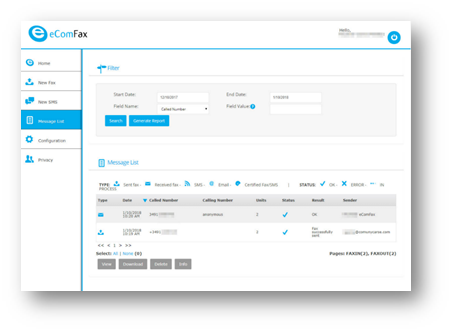
To check for received faxes in the web interface, access the “Message List”. Select “Field Name:“ = “Type” and “Field Value” = “Received Fax”.
Receiving faxes by email
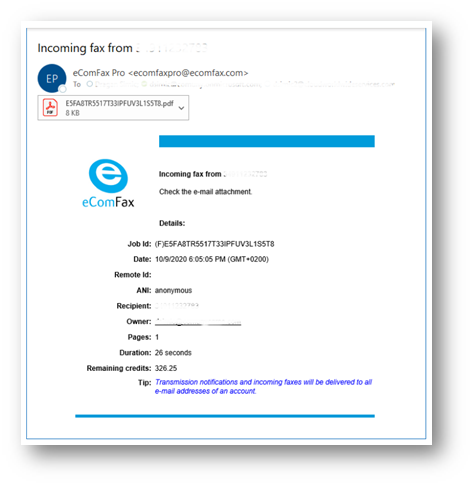
Every time the user receives a new fax, an email will be received (with the fax as an attachment). The email address is the one/default assigned by the user when the service and subscription was purchased and activated. Please note that up to 3 different email addresses may be added/defined as additional delivery points.
Please note that fax reception may be configured in a PDF searchable format. This will enable searching of content in the user’s email client (for instance: by contract number ”C0102930” or SSN). This will work as long as the received fax is not hand-written.
In the event a user does not receive a fax in their email inbox, make sure you also check your spam folder along with the web interface to double check whether the fax has been received properly or not and consequently exclude the spam filter issue.