
Here are all the options available in the delivery section.
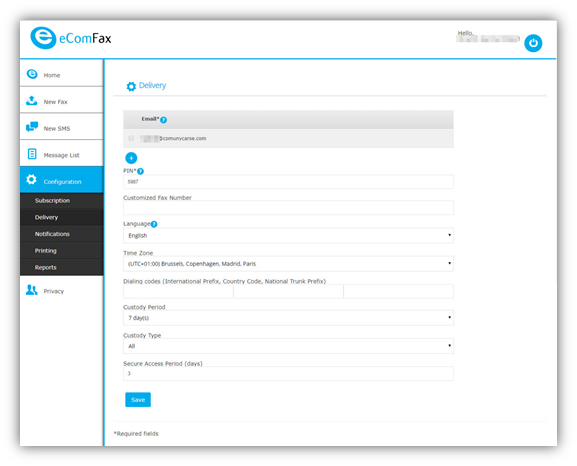
Email: This is where you allocate additional email addresses (or domains for Enterprise subscriptions) that you authorize to be secure senders of faxes from their email client for this account. You can have a maximum of three additional ones. The email registered here will both send and receive
To add a new one simply press the "+" button and use the "-" button to remove any later. However, the primary email can not be removed and needs to be changed by the support team or your Marketplace provider.
PIN: A PIN Code is a 4-digit number that must be placed at the very beginning of the “Subject field” when sending fax via the Email interface. This is used for security purposes. Please do not leave a blank space between the PIN and the SUBJECT field.
Note: In case DomainKeys Identified Mail (DKIM) validation technique is used, PIN entry is not needed. DKIM is an email authentication method designed to detect forged sender addresses in emails (email spoofing), a technique often used in phishing and email spam. It is specific to email provider; some may have this technique implemented while some not (eg. Microsoft Office 365 has DKIM built-in).
Customized fax number: A unique number that will appear on the cover page of all faxes.
Language: Indicates the default language of the notification messages and platform access.
Time Zone: eComFax® is a worldwide service, so the time zone may be adjusted in this field so as to receive the faxes at the date and time relevant to the user’s location.
Dialing code: For national calls, it is unusual to include the country code. As eComFax® only uses international numbers, the deliveries to its country are completed correctly with this option. As a result, the user may add the country code here, so that the system will deliver it correctly.
Storage and safekeeping.
30-day Free of Charge storage is included by default in any subscription; however, the user may want to keep fax or other documents for more than 30 days.
Users can increase the retention period by accessing the “Custody Period” Field. Note that HIPAA, Dodd-Frank Act, or MiFID II regulations (among others) may require companies to keep document records for at least 5 years.
Note: Changing the custody period will only take effect on new faxes after the change has been saved and previous faxes will need to have the custody manually changed via the message list.
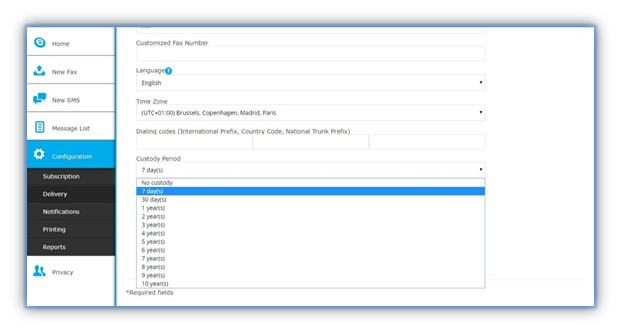
Tip: Only faxes are stored, not SMS.
Custody Period: Here you choose the type of fax that should be stored, incoming, outgoing or all.
Secure Access Period: This stipulates how long an access link in emails is valid.