
In addition to the information available in the table, you can access more extensive information through the Details  button. Clicking on this button will open a new screen in which you can consult in addition to the previous information the ID by which each case is identified as well as the information related to each of the interactions classified under it.
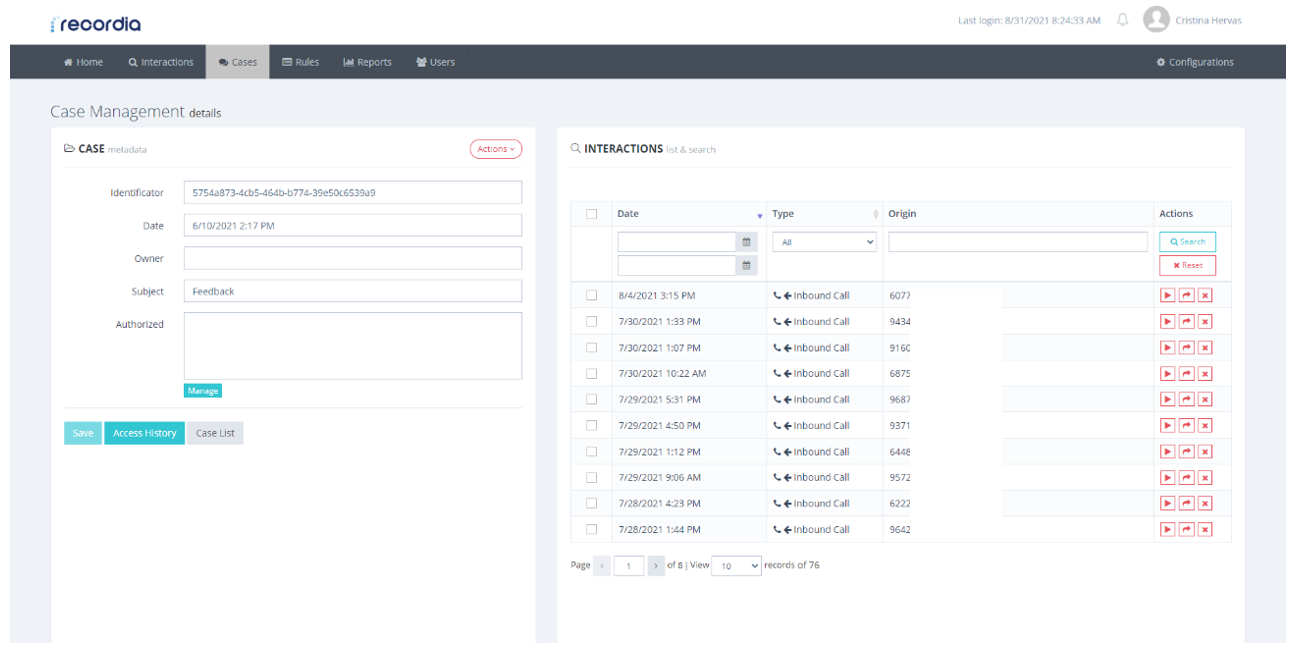
Detailed information for each case
In the left part of the screen, you will be able to consult the information of the interactions that will be:
- Date of completion
- Call Type– Whether it is an incoming or outgoing call.
- Source: phone number or source extension
- Actions: The interactions will be possible not only to listen to them in streaming without the need to download but also to move it from the case, that is, to change the label or delete it.
Within each case, you will have a history of accesses from which you can track the different interactions made, such as the download of information, its creation, or the classification of a new interaction.
Both the interactions and this history can be downloaded in ZIP in the case of the first and CSV or PDF in the case of the second that you must choose in the pop-up window that will appear once you select to download the history.
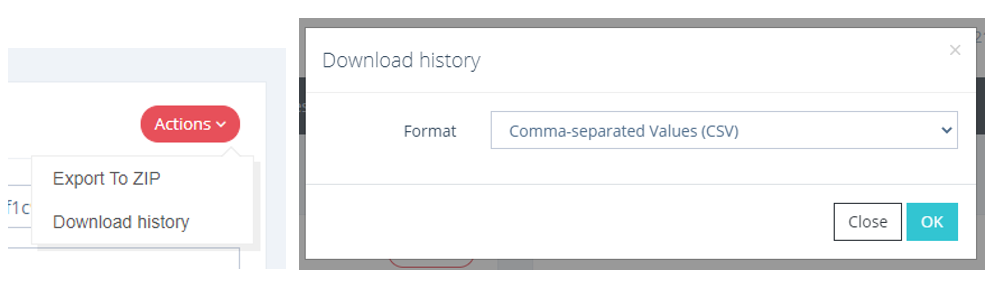
Action drop-down and download option modal.
On the other hand, it will be possible to perform a filtered search of both the interactions classified within a case and the cases on the outside screen so that your query is more efficient.