
Why eComFax CertiSMS®
As with Fax, some companies need a proof that an SMS message has been sent without any doubt. Consequently, they may use that proof in a legal process with the guarantee that the communication occurred at a specific date and time, that the content was a specific one (as a proof of authenticity), that the communication occurred between two addresses, and that an independent third party guarantees that this indeed happened.
This is the aim of CertiSMS®. So, when an SMS is sent using this method, the information about the sender, recipient(s), content and SMS metadata are digitally signed using a CA (Certification Authority) with a Digital Time Stamp (issued by a legal TSA) and a PDF certificate is issued to the sender with all – above-noted – information concerning authenticity what can subsequently be used in a possible legal process.
The certificate is issued by CWS as a 3rd party trust processor to certify that the content (as it is shown in the certificate) was sent from the number of the sender and addressed to the destination at that date and time. This can be used in a law process to ensure the authenticity of the content, the legitimacy of the sender and the date and time it was communicated. Delivery Certificates are securely kept on the platform for a period of 5 years.
Sending from your email
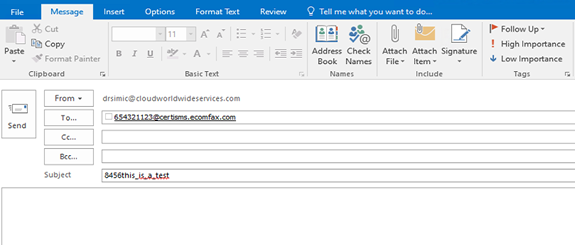
CertiSMS® can be used from any client email. The text in the “subject” field will be sent as text, minimizing any attachment or text in the body of the message.
Recipients mobile telephone number is placed, followed by “@certisms.ecomfax.com”. In the “Subject” field security PIN code should be placed, followed by the text that to-be-sent. The body of the text will be ignored. Please note that in case of DKIM validation, PIN code is not necessary.
Tip; CertiSMS® can only be sent via an email and not through the web interface.