Here is the information on the operations of CertiFAX®, for information about CertiFAX® and how to send one please click here.
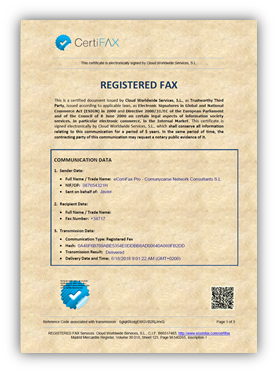
Once a CertiFAX® is sent, the recipient receives a fax and the result of the whole process is digitally signed and sent back to the sender as a certified legal proof of delivery.
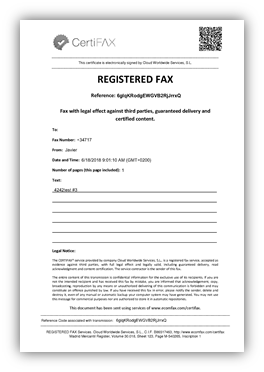
The certified fax includes a locator in the top area of the cover page. This locator allows review of the fax information and its content. The sender can also access the operations’ history by indicating the locator code on the client’s CertiFAX® website. This is also accessible through the QR code that appears on the cover page.
CertiFAX® tracks access to the CertiFAX® website and has several mechanism to ban unauthorized access.
The first page of the certified fax includes a QR code in the top, right-hand area. The certification report of delivery includes this same QR code on the first page in the bottom, right-hand area. This QR code contains the same information as shown in the previously mentioned locator.
The QR code can be scanned by using mobile devices in order to directly access the CertiFAX® website and show the information associated with the certified fax and the available operations.
Checking CertiFAXes
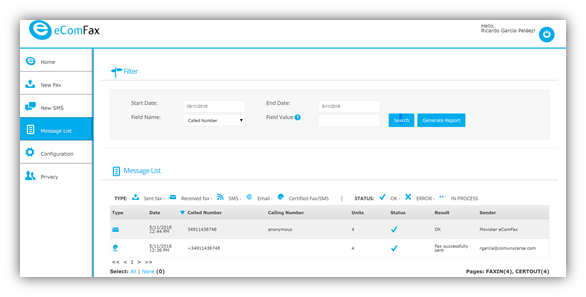
The user may want to keep the certificate for legal purposes. The certificate can be downloaded at any time by accessing the CertiFAX® website and using the QR Code. Accessing the “Message List” through the web interface, the user may check the status of all CertiFAXes.
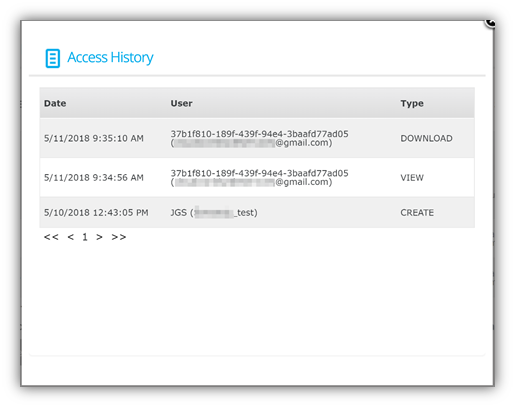
Furthermore, from the history of the client’s CertiFAX® website the user can see if a download has been requested by the recipient of the certified fax and when they accessed the certified fax. The remote, masked IP address is also registered; which is a requirement for Data Protection Regulations.