
Here will tell you what a PCIFax® is, how to send one and how to configure to receive all faxes as PCIFax®.
This method is used to send or receive documents with sensitive content; for instance, documents that contain private Credit Card information. Using this method, a sender sends documents in a similar way as with SecureFAX® but in order to comply with PCI DSS (Payment Card Industry – Data Security Standards), the following restrictions are implied:
- Documents can not be printed;
- Documents can not be forwarded;
- Documents can not be downloaded;
- Documents can not be intercepted.
An incoming DID can be assigned to a PCIFAX® fax delivery method ensuring protection of sensitive incoming credit card information and disabling access to the content by any interception method.
You can set this feature by adjusting the information on your fax number, you can find out how to here.
Sending from the Web interface.
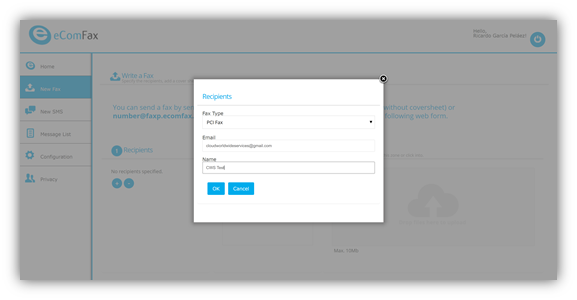
The user specifies fax type as “PCI Fax”. Instead of indicating a recipient’s number, user must specify recipient’s email address.
Sending from your email client.
In order to send a PCIFax® via email, please input the email of the recipient in the following format:
In the “To:” field, put the destination email address but replace the “@“ for a “+” symbol followed by “@pcifax.ecomfax.com” (to send without a cover page) or “@pcifaxp.ecomfax.com” (to send with a cover page.) For instance:
Peter.drove+company.com@pcifax.ecomfax.com
or
Peter.drove+company.com@pcifaxp.ecomfax.com
Start the SUBJECT with the PIN Code and then write the subject. The subject will be included on the cover notes. Do not leave a blank space between the PIN and the first word of the subject. (please note that PIN code is not needed in case of DKIM validation or if you are in the Enterprise subscription).
Receiving Incoming faxes using PCIFax®
One may assign a DID to receive faxes via PCIFAX®. There may be several reasons to use PCIFAX® as a receiving method instead of email delivery. For instance, one may not want email administrator or ISP to access the content or to intercept fax messages or one just wants to ensure attachments are not delivered to their email server.
By delivering incoming faxes through PCIFAX®, the email of an incoming fax only contains a link and not the attachment itself. In order to access the document, user has to be logged in to the eComFax webpage and once logged in he may visualize the content using a secure HTTPs connection.