
Here you will learn more about CertiFAX® and how they are sent, for the operations of CertiFAX® please click here.
What is CertiFax®?
Some companies need proof that a fax document has been sent without any doubt. Consequently, they may use that proof in a legal process with the guarantee that the communication occurred at a specific date and time, that the content was a specific one (as a proof of authenticity), that the communication occurred between two addresses and that an independent third party guarantees this indeed happened.
This is the aim of CertiFAX®. When a fax is sent using this method, the information about the sender, recipient(s), content, and fax metadata are digitally signed (using a certificate issued by a Certification Authority). Furthermore, a Digital Time Stamp (issued by a legal TSA) and a PDF certificate are issued and sent to the sender, capturing all – above-noted – information concerning authenticity what can subsequently be used in a possible legal process.
The certificate is issued by CWS as a 3rd party trust processor to certify that the content, as it is shown in the PDF certificate, was indeed sent from the number of the sender and addressed to the destination at that date and time. Delivery Certificates are kept securely on the platform for a period of 5 years.
Similar to a normal Fax, there are two options for sending a CertiFAX®, via navigating the web interface or via email.
Sending from the Web interface.
Once logged-in and on the home screen, the user chooses the “New Fax” icon.
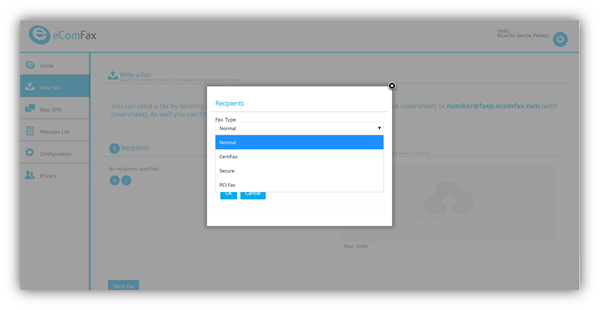
In the following window choose the recipient or create a new recipient by clicking on the “+” symbol and choose “CertiFax” as the Fax type. This means that the user must input the fax number of the destination.
The user input's the text for the cover page, and finally attach the file(s) to-be-sent as a fax.
Tip: The cover page is mandatory with CertiFAX®
Sending from your email client
In order to send a CertiFAX®, indicate in the “To” field the following email address: faxnumber@certifax.ecomfax.com.
As an example, the following should be done:
- To send a fax to a number ‘1212444333’, write the following address 1212444333@certifax.ecomfax.com;
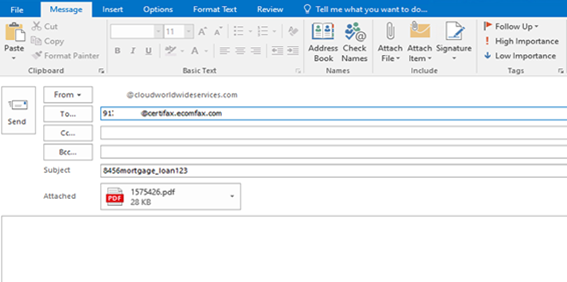
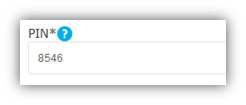
- Fill in the “Subject” field starting with user’s PIN code. A PIN Code is a 4-digit number that must be placed at the very beginning of the subject field. This is used for security purposes. Please do not leave a space between the PIN and the SUBJECT content. The PIN code can be accessed from eComFax web interface under <Configuration> tab, section “Delivery”;
Tip: Enterprise customers with domain set up also do not need the PIN
Note: In case DomainKeys Identified Mail (DKIM) validation technique is used, PIN entry is not needed. DKIM is an email authentication method designed to detect forged sender addresses in emails (email spoofing), a technique often used in phishing and email spam. It is specific to email provider; some may have this technique implemented while some not (eg. Microsoft Office 365 has DKIM built-in).
- Attach the document that should be send via fax;
- Please note that only the attachment(s) will be sent. The body of the email will be ignored;
- Click “Send” button.